Showing posts with label Translation Memory. Show all posts

Thursday, April 14, 2016

CAT tools and translation style

Most professional translators use Computer Assisted Translation (CAT) tools. Many of the translators who don't use CAT tools, however, claim that CAT tools are useless for more creative translations: no time is saved by translation memories – no repetitions, fuzzy or 100% matches – while using the tool weakens the translator's writing style.

I believe that these translators are both right and wrong. Yes, segment matching is less useful for translating documents that are not repetitive, but the use of translation memory is still of great help even for texts that are not repetitive at all: concordance search – offered by all translation memory tools – is what helps most, here: it lets us see in our translation memories how we translated similar words or phrases before, even in sentences that are not close enough to the one we are translating to appear as a fuzzy match.

On the other hand, indiscriminate use of CAT tools, especially in documents that need a more creative approach, may hamper translation style if the translator uses the CAT tool as he would normally use it for technical texts.

One of the drawbacks of CAT tools is that they make it far too easy to carry over the sentence structure of the source language into the target language. CAT tools offer segment joining and splitting as a partial remedy, but busy translators working under time pressure seldom use these features, which, in certain instances, are not available (usually you cannot join across hard returns), or are cumbersome: what if you need to move the first sentence of a paragraph to the end of the same paragraph? You cannot do that by just joining two sentences together.

Other drawbacks are:
  • Using the same sentence order in the target language as in the source language;
  • Using the same number of sentences in the target language as in the source language (even when the target language text would be better by joining or splitting sentences);
  • Letting the sentence structure in the source language affect the target language – for example, use of a sentence pattern in the translation that is similar to the sentence pattern used by the source language, even when a different sentence pattern might be better in the target language;
  • Writing numerals in the target language the same way as in the source language – even when the two languages may differ on such things as the separators used for thousands and decimals, or which numbers should be spelled out and which should be written in digits;
  • Patterning punctuation and capitalization in the target language after the source language – for example, use of capitals after a colon when translating English into Italian, or leaving a space before a colon when translating from French;

All these kinds of problems (against which translators should pay attention even if they do not use CAT tools) are exacerbated because text segmentation makes it more difficult to see the structure of the page, especially when using more modern tools like Studio or memoQ that use a table approach – MSWord-based tools such as Wordfast Classic make it easier to see where on the page any given sentence goes.

So, if concordance is the feature that best helps translators of more creative texts, but slavish adherence to the source structure is what may most hamper them, what's the alternative?

  • For certain translators the answer is "don't use CAT tools", but what if you want to take advantage of CAT tools helpful features without risk damaging the beauty of your translation? I believe that an answer is the following workflow:
  • First you change the segmentation rules in the translation tool, to segment not at the sentence, but at the paragraph level. If the segment on which you are working is an entire paragraph, the tool cannot lull you into using the same number of sentences, the same sentence structure or the same sentence order as the source text. You are free, for example, to move text from the beginning of a paragraph to the end, if that better suits your style.
  • After changing segmentation, next you should consider the translation produced in the CAT tool as a mere draft to be exported and fine-tuned outside the tool: this way you can perfect your final version in a word processor without being distracted by the sentence-to-sentence pairing offered by the CAT tool.
  • After revising your translation as a standalone document, you should finish your work by comparing it to the source, to make sure the meaning and style of the original are conveyed and preserved in the target.
  • Finally, in this workflow you create an updated translation memory by aligning the source text to the final draft produced outside the CAT tool. This way, your translation memory is up to date, and available for future projects, while your translation does not suffer the stiffness that may be introduced by mechanical use of CAT tools.


While I propose paragraph segmentation, I know that other translators who use CAT tools for creative translation prefer to start with normal segmentation. That way they are sure not to miss any sentence, and they take care of any necessary changes to sentence structure afterwards, when they revise their translation outside the CAT tool.


Both options of this workflow are illustrated in the following diagram:
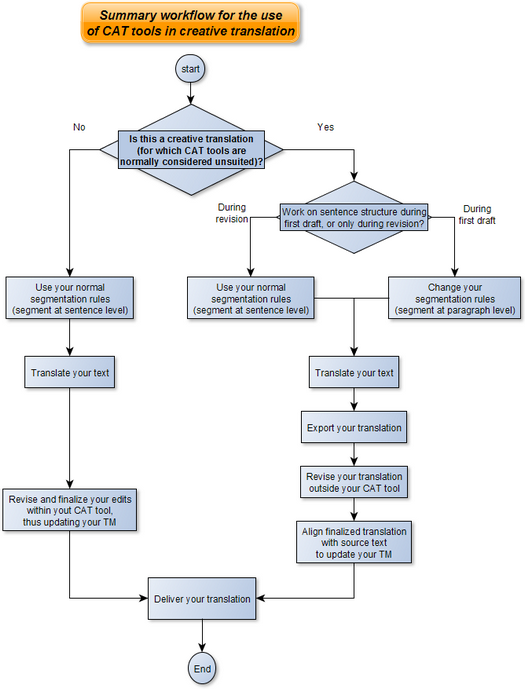
Summary workflow for the use of CAT tools in creative translation
I've deliberately not given step-by-step instructions for specific CAT tools: Paul Filkin in his excellent blog  Multifarious already described how to use Studio for a similar purpose in his article Translating Literature... and you can adapt this method to other CAT tools.

Bear in mind that while this approach may suit transcreation or creative translation, it is not what works best when dealing with technical translations: it is a technique that helps slow you down, not speed you up. For most freelancers, it would give flexibility with one hand while taking away speed with the other. Besides, in technical, legal and most other commercial translations, preserving a similar structure between source and target is usually a good thing.

Saturday, July 16, 2011

Don’t search from the wrong side: a reminder for SDL 2009 users

A frequent complaint against SDL Trados Studio 2009 is that sometimes the program doesn’t find matches the user is sure are in memory.

The problem is real and we have seen it, but I believe that sometimes what the user is complaining about is a mismatch between Studio 2009 and Trados 2007.

In Trados 2007 it was possible to search a concordance only on the source text. This was a severe drawback (no target concordance), but it was simple to use: highlight some text, click on the concordance button (or hit F3), and you got your results.

In Studio 2009, on the other hand, you can find concordances not only on the source, but also on the target. This is great, but it also means that depending on where you highlight text, you may not get the results that you expect.

For example, if you copy your source text to target (to overwrite it – a frequent technique when translating marked-up text). You have on the right of the editor’s pane (the target part), text that is still in your source language. You highlight a few words, because you are sure you had encountered them earlier, and want to see your previous translation. You click F3 to invoke the concordance search…

StudioConcordance_example1

…and don’t get any match. Yet you are sure you have that string in memory. What happened?

What happened is that if you selected the text in the target part of the screen, and then called the concordance search, you were searching for a concordance on the translated text – but since the text you selected is not translated yet, the concordance doesn’t return any result.

If you selected the same words on the left (the source part of the screen), then launched the concordance search, you would get the result you expected:

StudioConcordance_example2

So, even though it is true that Studio 2009 sometimes does not return matches you do have in memory, the program is not always to blame – just remember to launch your concordance searches from the appropriate side of the screen.

Update – Solutions for different concordance searches

Thanks to SDL’s Paul Filkin – here is how to handle the different concordance searches in Studio 2009:

    • F3 will take the source when you are in source, and target when you are in target
    • Ctrl+F3 will always search the source no matter where you take the text from.
    • Ctrl+Shift+F3 will always search the target no matter where you take the text from.

…and (again according to Paul), you can even customize these shortcuts, to better suit your needs.

I like having a tool with a rich set of options – even if that sometimes means a steeper learning curve.
.

Tuesday, November 23, 2010

How to run Trados 2007 with Word 2010

Supposedly, Trados 2007 (the last "classic" version of Trados) does not work with Word 2010: since Office 2010 was released after Trados 2007, Trados does not detect the new version of Office.

SDL, however, provides a workaround. I have tested the fix with Word 2010 on a Windows 7 64-bit Ultimate machine, and it does work, as you can see from this screenshot.


The workaround is neither guaranteed nor supported (as the SDL article makes clear). But since it seems to work, it might extend Trados "classic" usefulness on newer machines.

For detailed instructions, see the following instructions (suggested by SDL's original article: "SDL Trados 2007 Suite toolbar compatibility with Microsoft Office 2010", article # 3359):

To use Trados 2007 toolbar with Microsoft Office 2010, hook up Word 2010 with SDL Trados Translator's Workbench 2007, as follows:

  1. Make sure that Trados, MultiTerm and Microsoft Office (Word, Outlook, etc.).
    are not running
  2. Find the file Trados8.dotm in the folder C:\Program Files\SDL International\T2007\TT\Templates.
  3. Copy Trados8.dotm into the following folder:
    • Windows XP: C:\Documents and Settings\[USERNAME]\Application Data\Microsoft\Word\Startup\
    • Windows Vista or Windows 7: C:\Users\[USERNAME]\AppData\Roaming\Microsoft\Word\Startup\
    • If the folder already contains a Trados8.dotm file, overwrite it
  4. Find the file MultiTerm8.dotm in the folder C:\Program Files\SDL\SDL Multiterm\Multiterm8\Templates\.
  5. Copy MultiTerm8.dotm into the following folder:
    • Windows XP: C:\Documents and Settings\[USERNAME]\Application Data\Microsoft\Word\Startup\
    • Windows Vista or Windows 7: C:\Users\[USERNAME]\AppData\Roaming\Microsoft\Word\Startup\
    • If the folder already contains a MultiTerm8.dotm file, overwrite it. 
Start Microsoft Word 2010. You should now see, and be able to use, Trados's Workbench or MultiTerm from Microsoft Word 2010.

Update


I've updated this post, adding the above detailed instructions, since the link to SDL's article was not working properly.

Wednesday, March 03, 2010

SDL launches low-cost entry-level CAT solution

SDL announced today it will introduce an entry-level, low-cost translation memory tool. The new product, the Starter edition of SDL Trados Studio, will be subscription software only, at a monthly fee of 8 Euros.

The most serious limitation of the Starter edition is the 5,000 translation units limit per TM: enough for working on a new medium-sized project, perhaps, and therefore for giving a new user an idea of how the full product works; not enough for working on major projects where a translation agency sends to the translator a larger TM. The Starter edition will open only certain SDL translation packages, not all, like the freelance edition. Finally, the Starter edition does not include Trados 2007 or Multiterm.

You can read the full announcement on the SDL site, and you can also see there a full product comparison chart.

My first reaction: the Starter edition is more of an extended demo than something useful for a professional translator, although it might be good enough for an "occasional translator" (SDL's words).

The lack of Trados 2007 means that users of the Starter edition will not be able to handle legacy Trados formats. I believe the aim is to encourage adoption of SDL Trados Studio, which so far has seen little actual use (all the agencies with which we work, for example, have continued to request ttx or bilingual MS Word files, not SDL Trados Studio files). This is also clearly a move against Lionbridge's Translation Workspace, another recently introduced subscription tool aimed at a similar audience.

Sunday, November 08, 2009

Misleading software descriptions: Site Translator

The ZDNet's overview of Site Translator, an automatic web localization tool, states
Site Translator uses automated machine translation technology [that] is capable of translating entire Web sites in a matter of minutes and you do not need to know the translated language. If you need to improve accuracy, Site Translator has a feature called translation memory, which helps you fine-tune exact language phrases [Italics mine].
For all I know, Site Translator might be a useful program, in the right hands. Used by someone who "[does] not need to know the translated language", and who might be mislead into thinking that translation memory, by itself, will somehow help him to "fine-tune exact language phrases", it is a sure recipe for localization disaster.

Friday, October 16, 2009

The limitations of project memories

A feature offered by most CAT tools is the possibility of creating project memories from larger memories. Typically, to create a project memory, the PM analyzes the files to translate against a master memory, and the CAT tool includes in the project memory only the segments that would be useful as fuzzy matches. The translator thus receives only the part of the translation memory that provides fuzzy matches and 100% matches.

There are several different reasons to do this: from the need to give the translator smaller files, to the requirement of not sending out a full translation memory because of the risk of disclosing some sensitive or proprietary information.

Whatever the reason for creating limited project memories, end customers, translation companies and project managers often overlook something important: a project memory is, by definition, an incomplete memory. This harms translation by limiting the usefulness of concordance searches. A term already translated in a segment that is not similar enough to other segments as to be a fuzzy match would not be found by a concordance search on a project memory, whereas that very segment would be found if the same search were conducted on the master memory. Not finding an already translated term because of the limitations of project memories affects the quality and consistency of the translation.

The customer or the translation company may still decide that security reasons outweigh the quality disadvantages of using project memories, but the choice should be deliberate, not something arrived at by chance out of not trusting the translator.

Thursday, August 28, 2008

Yet again: Trados fuzzy match woes (Expanded)

Continuing from my post of August 25, some further evidence of just how badly designed the fuzzy matching algorithms are in Trados:

So, according to Trados, "INSTALLING DISPLAY" is a 67% match for "Installing Display", while "Ownership of the Services and Marks." is a 65% match for "Description of the Service and Definitions."


A smarter matching algorithm would give more importance to meaningful words ("Description", "Service", "Definitions") than to grammatical ones ("of" "the" "and"), and would treat a difference between upper and lower case as much less significant than the chance similarity of two sentence structures.

By the way if "Installing Display" is changed to "Installing the Display", it does not come up as a fuzzy match at all (unless the fuzzy threshold is set extremely low), since it becomes a mere 40% match:


The worse thing is that all these problems have been known for years, but Trados (and now SDL/Trados) programmers have done nothing to improve the situation.

Wednesday, August 27, 2008

Trados: which bugs have been fixed?

I've just received a rather pushy call from an SDL/Trados representative. He wanted to know if I was considering upgrading from Trados 2007 to the newest version. When told that I was actually consider whether to change to a competitor's product, he asked why.

The reason I gave him was defects in the program, and old bugs never fixed.

I wonder however, if any of the more persistent bugs have been fixed with the latest releases - as far as I know, they haven't, but I would be happy to learn otherwise.

In particular, I'm thinking of such longstanding defects as the poor quality of low-fuzzy matches (see the previous post), the fact that formats are often mangled in MS Word documents, the irregular behavior of Workbench when translating MS Word tables with multiple columns (when Set Close/Next Open Get skips entire rows), the absence of shortcuts to open directly the previous segment, or the feebleness of the search functions within Tag Editor.

As far as I know, all development efforts were focused on supporting Vista/Office 2007, on corporate features, and on fixing some really disastrous new bugs (if any were introduced or discovered recently).

No real improvements to longstanding bugs, defects and annoyances as mentioned above. Does anybody know if this is still true, or which defects (if any) have been fixed after, say, version 7.1 and which improvements have been implemented?

Monday, August 25, 2008

Yet again: Trados fuzzy match woes

I sometime wonder whether SDL Trados programmers even understand the concept of fuzzy matching, or, if they do, whether they care or have pride in their job - only incompetent programmers would create or use a fuzzy matching algorithm that leads to ludicrous results such as these:


That's right: according to Trados, the segment "Ownership of the Services and Marks." is a 65% match for "Description of the Service and Definitions."

After all, "of the" and "and" are exactly the same in both sentences.

Tuesday, July 29, 2008

How to win back discontented Trados users

Today I received a phone call from an SDL representative: he had seen that I had accessed the SDL site (to download an updated copy of WorldServer Desktop Workbench), and tried to sell me some new service or product.

Unfortunately for my caller, I had just loaded a new termbase in MultiTerm, so some of the glaring shortcomings of SDL technologies were fresh in my mind. The phone call, far from a successful sales pitch, soon became a diatribe against some of Trados' long-standing problems.

I then received a follow-up e-mail:
"...[I] am sorry you feel discontent with our products. I would like to win back your commitment to our technology, just let me know in what direction we can possibly do that."

My answer summarized some of the more pressing (and annoying) problems with Trados and MultiTerm:

  1. MS Word interface: fix the formatting problems - it is unacceptable that Trados consistently messes up the formatting of even simple MS Word documents. Other TM products that also use MS Word as an interface (for example, Wordfast) experience far fewer formatting problems with MS Word (or none at all).
    Please note:
    • advising translators to use TagEditor instead is a cop out, and, at best, only a partial solution,
    • saying that the MS Word document should be formatted some other way, that styles should be applied in some other more controlled manner, or similar advice is useless for translators: we translate the document we get, not the document we wish we would get.

  2. Concordance search: a translator should be able to search not only on the source language, but also on the target.
  3. TagEditor: recommending the use of TagEditor for the translation of MS Word documents would be more acceptable if TagEditor were a richer text editor. For starters, it should offer more powerful search functions (at least the equivalent of MS Word wildcard searches; better still, full regular expressions).
  4. MultiTerm: a more user-friendly and less counterintuitive interface and process would help.
  5. Artificial limitations to the freelance edition of Trados. Two translators who acquire two different freelance licenses should be able to run them on the same home network, without the need to purchase a more expensive version of the program.
What are the things that bug you most as regard Trados, MultiTerm and the other SDL products? What would you add to my list (or remove from it)?

Friday, March 21, 2008

Trados 6.5 and SDLX 2004 (or older) no longer eligible for upgrade after April 1st, 2008

With a remarkably misleading title ("Our upgrading guidelines are changing"), SDL announces that, from April 1st, 2008, Trados v6.5 (or older) and SDLX 2004 (or older) will no longer be eligible for upgrade price, and that people wishing to upgrade their old software after that date will have to buy a new (i.e., full price) license.

The first page of the announcement only indicates that

our upgrade guidelines will be changing from Tuesday 1st April, 2008


Only if you click on "Visit our Frequently Asked Questions section", you'll find that

If you are on versions Trados v6.5 or previous or SDLX 2004 and previous, we recommend you upgrade to SDL Trados 2007 now in order to retain discounted upgrade pricing for the software. From the 1st of April 2008 onwards, there will no longer be upgrade eligibility from these versions.


Stopping eligibility entirely is, indeed, a change, but the way it is presented is misleading and borders on the outright dishonest.

So, many translators who were working happily with Trados 6.5, and had no intention to upgrade right now (but thought they might upgrade later, when they purchased a new computer with Windows Vista and Word 2007), will either have to upgrade immediately, or be compelled to pay full price later.

Of course, they might also decide to stay with the current version, and look for a competitive upgrade to some other tool later.

Way to go, SDL: instead of improving your buggy software to build up customer loyalty, compel the customer to upgrade RIGHT NOW, or lose that benefit forever.

Tuesday, February 26, 2008

When are two names 67% the same?

Would you prefer:
  • To have "afxc04z5.htm" suggested as a translation when the html file in the string you are translating is actually "afxc04z5_10.htm"?
Or
  • Would you rather copy manually the file name from the source segment to the target one, avoiding the risk of accepting a wrong file name while typing rapidly?
I would always opt for the second option - it's just too easy accepting a fuzzy match "as is", when you are typing fast, and this type of error is serious (it would break a web site), and remarkably difficult to spot (file names looks similar, and re-reading the translation there is no logical clue to indicate that something is amiss).

The brillant programming team that gave us useless fuzzy matches like this or this one, once again chooses the wrong answer:

Wednesday, January 30, 2008

Voting on Trados features

In my previous post I complained about Trados fuzzy matching algorithms.

Among the comments I received there is one from an SDL marketing representative, who sais to enter suggestions and ideas in a portal they created to gather the votes of other users. The address of this portal is http://ideas.sdltrados.com.

If true, that is, if SDL is actually going to act on their user's opinions, this would be a step in the right direction: too many of the features added in recent years were not aimed at helping translators but rather only translation users or companies.

It is time that SDL remembered that Trados was supposed to be a tool for translators.

Shouldn't Trados programmers improve their matching algorithms?

I sometime wonder what the programmers at SDL/Trados think that "similar" means, but I'm sure that what they think must be different from what most translators think.

Take for example the strings
  1. "- LEAD DESIGN -",
  2. "- LEAD PROGRAMMER -", and
  3. "Lead Design".

Most translators, when asked to translate "- LEAD DESIGN -", would find the translation of "Lead Design" more useful than knowing the translation of "- LEAD PROGRAMMER -".

Seemingly, Trados programmers disagree: as you can see from this screenshot,
Trados considers "- LEAD PROGRAMMER -" a 75% fuzzy match for "- LEAD DESIGN -", while "Lead Design" only gets a 67% score.

How the program arrives at this result is clear: both strings 1 and 2 follow similar patterns (all caps, leading a trailing dashes), while 3 doesn't.

But writing a more intelligent algorithm shouldn't be all that difficult: a better algorithm would give more weight to the actual words, and not to such irrelevant characteristics as case or dashes.

Trados programmers should, in short, try to think of what is useful to translators, and implement that in new algorithms, rather than rely on old ones that have probably not changed in over ten years.

Monday, January 21, 2008

European Commission Translation Memories Available for Download

The European Directorate General for Translation (DGT) has made publicly accessible its multilingual Translation Memory for the Acquis Communautaire.


The Acquis communautaire is a collection of texts and their translation in 22 languages. It comprises the entire European legislation, including all the treaties, regulations and directives adopted by the European Union (EU) and the rulings of the European Court of Justice.


The memories can be downloaded from The DGT Multilingual Translation Memory
of the Acquis Communautaire: DGT-TM
, which also contains an explanation of what the materials available are and how they can be used.


I found the announcement on the Global Watchtower, the bulletin of Common Sense Advisory. The original announcement also includes valuable insight about how translation companies (and I think also translation professionals), will be able to take advantage of this multilingual corpus.