Most professional translators use Computer Assisted
Translation (CAT) tools. Many of the translators who don't use CAT tools,
however, claim that CAT tools are useless for more creative translations: no time is saved by translation memories – no repetitions, fuzzy or 100%
matches – while using the tool weakens the translator's writing style.
I believe that these translators are both right and wrong.
Yes, segment matching is less useful for translating documents that are not
repetitive, but the use of translation memory is still of great help even for
texts that are not repetitive at all: concordance search – offered by all
translation memory tools – is what helps most, here: it lets us see in our
translation memories how we translated similar words or phrases before, even in
sentences that are not close enough to the one we are translating to appear as
a fuzzy match.
On the other hand, indiscriminate use of CAT tools,
especially in documents that need a more creative approach, may hamper translation style if
the translator uses the CAT tool as he would normally use it for technical texts.
One of the drawbacks of CAT tools is that they make it far
too easy to carry over the sentence structure of the source language into the
target language. CAT tools offer segment joining and splitting as a partial
remedy, but busy translators working under time pressure seldom use these
features, which, in certain instances, are not available (usually you cannot
join across hard returns), or are cumbersome: what if you need to move the
first sentence of a paragraph to the end of the same paragraph? You cannot do
that by just joining two sentences together.
Other drawbacks are:
- Using the same sentence order in the target
language as in the source language;
- Using the same number of sentences in the target
language as in the source language (even when the target language text would be
better by joining or splitting sentences);
- Letting the sentence structure in the source
language affect the target language – for example, use of a sentence pattern in
the translation that is similar to the sentence pattern used by the source
language, even when a different sentence pattern might be better in the target
language;
- Writing numerals in the target language the same
way as in the source language – even when the two languages may differ on such
things as the separators used for thousands and decimals, or which numbers
should be spelled out and which should be written in digits;
- Patterning punctuation and capitalization in the
target language after the source language – for example, use of capitals after
a colon when translating English into Italian, or leaving a space before a colon
when translating from French;
All these kinds of problems (against which translators
should pay attention even if they do not use CAT tools) are exacerbated because
text segmentation makes it more difficult to see the structure of the page,
especially when using more modern tools like Studio or memoQ that use a table
approach – MSWord-based tools such as Wordfast Classic make it easier to see
where on the page any given sentence goes.
So, if concordance is the feature that best helps translators
of more creative texts, but slavish adherence to the source structure is what
may most hamper them, what's the alternative?
- For certain translators the answer is "don't use CAT
tools", but what if you want to take advantage of CAT tools helpful features
without risk damaging the beauty of your translation? I believe that an answer
is the following workflow:
- First you change the segmentation rules in the
translation tool, to segment not at the sentence, but at the paragraph level.
If the segment on which you are working is an entire paragraph, the tool cannot
lull you into using the same number of sentences, the same sentence structure
or the same sentence order as the source text. You are free, for example, to
move text from the beginning of a paragraph to the end, if that better suits your
style.
- After changing segmentation, next you should consider
the translation produced in the CAT tool as a mere draft to be exported and
fine-tuned outside the tool: this way you can perfect your final version in a
word processor without being distracted by the sentence-to-sentence pairing
offered by the CAT tool.
- After revising your translation as a standalone
document, you should finish your work by comparing it to the source, to make
sure the meaning and style of the original are conveyed and preserved in the
target.
- Finally, in this workflow you create an updated
translation memory by aligning the source text to the final draft produced
outside the CAT tool. This way, your translation memory is up to date, and
available for future projects, while your translation does not suffer the
stiffness that may be introduced by mechanical use of CAT tools.
While I propose paragraph segmentation, I know that other
translators who use CAT tools for creative translation prefer to start with normal
segmentation. That way they are sure not to miss any sentence, and they take
care of any necessary changes to sentence structure afterwards, when they
revise their translation outside the CAT tool.
Both options of this workflow are illustrated in the
following diagram:
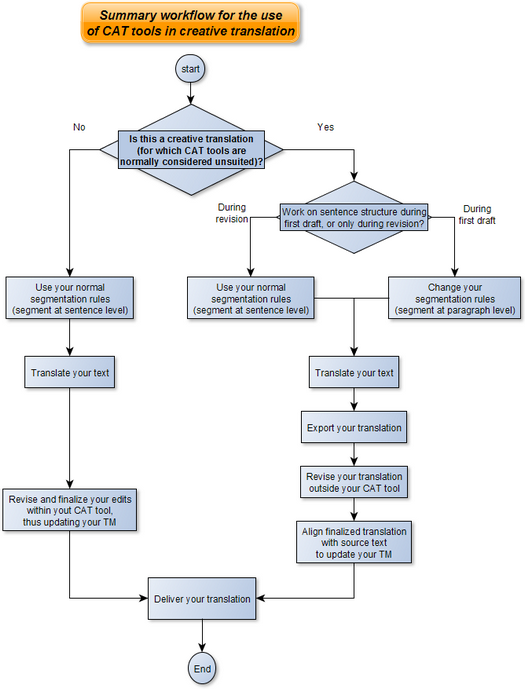 |
| Summary workflow for the use of CAT tools in creative translation |
I've deliberately not given step-by-step instructions for specific CAT tools: Paul Filkin in his excellent blog
Multifarious already described how to use Studio for a similar purpose in his article
Translating Literature... and you can adapt this method to other CAT tools.
Bear in mind that while this approach may suit transcreation or creative translation, it is not what works best when dealing with technical translations: it is a technique that helps slow you down, not speed you up. For most freelancers, it would give flexibility with one hand while taking away speed with the other. Besides, in technical, legal and most other commercial translations, preserving a similar structure between source and target is usually a good thing.


